CIFOG / INTERACTIVE STUDIES

Learn by
changing things.

Small interactive labs to explore what happens when you change a material, a texture, a connection or a line of code. Open one, experiment, and bring the result back to class.

Explore the areas

LEARNING AREAS

Choose an area

Explore a tool or a subject. Each area has its own labs, from Blender and game development to live production and design.

3D SOFTWARE · 20 LABS

Blender

Start with the interface, then follow a 3D production from modeling to animation. Geometry Nodes has its own four-part path.

00

Blender basics

The first hours in Blender: move around a scene, move objects, edit a mesh and keep the scene in order.

3 labs
20 / BLENDER BASICS AVAILABLE

Viewport Lab

Your first hour in Blender's 3D Viewport: orbit, pan and zoom, frame objects, use the axis views and Auto Perspective, select with click, Shift, B and A, and move, rotate and scale with G, R and S, axis constraints, typed values, cancel and undo.

Navigation · selection · G R S · exact valuesOpen lab
21 / BLENDER BASICS AVAILABLE

Edit Mode Lab

Press Tab and edit the mesh: vertex, edge and face select modes, X-ray, edge loops, moving parts of a mesh, Extrude, Inset, Loop Cut and Bevel, cleaning a broken mesh with Merge by Distance, Delete and Dissolve, and a stool as the final challenge.

Select modes · extrude · loop cut · clean meshOpen lab
24 / BLENDER BASICS AVAILABLE

Outliner Lab

Put a game level in order with the Outliner: collections inside collections, objects linked to two collections, collection instances, exclude, hide, disable in renders and selectable, isolate, search and filters, Object Contents, and the Blender File and Unused Data modes to remap and purge data-blocks.

Collections · visibility · filters · data-blocksOpen lab
01

Modeling & UVs

Build clean meshes and unfold them for textures.

2 labs
11 / MODELING AVAILABLE

Topology Lab

A Blender-style Edit Mode on small meshes: fix n-gons and triangles, find poles, keep shapes under Subdivision Surface with holding edges and creases, put edge loops where an elbow bends, and build a clean retopology cage on a sculpt.

Quads · subdivision · edge loops · retopologyOpen lab
02 / UV MAPPING AVAILABLE

UV Unwrap Lab

Read a UV map, mark seams and unwrap a cube and a cylinder, see why a closed object will not unwrap, project from view, cylinder and sphere, and finish with Smart UV Project, Pack Islands and Average Islands Scale.

Seams · Unwrap · projections · PackOpen lab
17 / OPTIMIZATION AVAILABLE

LOD & Mipmaps Lab

Understand levels of detail: watch a LOD Group switch as a rock gets smaller on screen, set its thresholds from the error in pixels, make the LODs with Decimate, stop a floor from shimmering with mipmaps and filtering, and fit a field of rocks in a triangle budget.

LOD Group · Decimate · mipmaps · budgetOpen lab
GN

Geometry Nodes

Four linked labs with a working node editor: from geometry flow to fields, scatter and a procedural fence.

4 labs
GN 01 / GEOMETRY NODES AVAILABLE

Geometry flow

Connect Group Input and Group Output, transform and join primitives, then expose a control to build a procedural table.

Geometry · primitives · modifier inputsOpen lab
GN 02 / GEOMETRY NODES AVAILABLE

Fields and attributes

See how Position, Index and Normal evaluate at each point. Use Math, Vector Math and Set Position to turn a Grid into terrain.

Fields · Spreadsheet · terrainOpen lab
GN 03 / GEOMETRY NODES AVAILABLE

Instances and scatter

Scatter rocks on the terrain from GN 02 with Distribute Points on Faces, Instance on Points, Random Value and a field mask.

Scatter · random scale and rotation · selectionOpen lab
GN 04 / GEOMETRY NODES AVAILABLE

Curves and final project

Use Curve Line, Curve Circle, Resample Curve, Curve to Mesh and Curve to Points to build a reusable procedural fence.

Curves · posts · exposed controlsOpen lab
02

Materials & texturing

How a surface reacts to light, how the detail of a sculpt becomes images, and how one texture can dress a whole set.

5 labs
01 / 3D MATERIALS AVAILABLE

Material Lab

Build PBR materials in a Blender-style Shader Editor with the full Principled BSDF: roughness, metal, colour spaces and masks, bump and real displacement, emission and Glare, glass in EEVEE and Cycles, coat, sheen, subsurface, thin film and brushed metal. Seven stages and a free Studio with presets.

Principled BSDF · EEVEE and Cycles · displacementOpen lab
09 / TEXTURING AVAILABLE

Baking Lab

Bake a high poly crate into a normal map, ambient occlusion and colour for a 12-triangle cube: watch the rays, fix Extrusion, Cage and overlapping UVs, read the colours of tangent space and take the maps to a game engine. Then bake it again in a Substance Painter-style Baking window.

Selected to Active · cage · tangent space · Substance PainterOpen lab
12 / TEXTURING AVAILABLE

Trim Sheet Lab

Build a medieval wood and stone trim sheet from scratch and use it: choose the texel density from the platform and the camera, plan the strips, model the high poly at real scale, bake normal and ID maps in Blender, texture it in Substance Painter with ID masks, put UV islands on the strips with G, S and R, round edges with bevel strips and Weighted Normal, and texture many props with one material.

Texel density · high poly · bake · Painter · UVsOpen lab
22 / TEXTURING AVAILABLE

Tileable Texture Lab

Use tileable textures in Blender with Repeat and the Mapping node, lay out UVs for them (outside 0–1, same size, round the corner), make one from a photo in a Photoshop-style workspace (crop, even light, Offset, Clone Stamp, Healing Brush, Pattern Preview), keep PBR maps tiling and aligned, project with Box and break the repetition.

Photoshop Offset · UVs · Box projectionOpen lab
16 / TEXTURING AVAILABLE

Texel Density Lab

Understand texel density, pixels of texture per metre: see it with a checker map, compute it in px/m, make every prop equally sharp with S, Average Islands Scale, Pack Islands and Set TD, choose the target from the camera and the texture budget, and give hero areas more on purpose.

Checker map · px/m · Set TD · memoryOpen lab
03

Light & camera

Light the scene, then photograph it like a camera would.

2 labs
10 / LIGHTING AVAILABLE

Lighting Lab

Light a plaster bust with Point, Sun, Spot and Area lights, a bounce card and HDRIs. Measure it with a light meter: inverse square law, hard and soft light, three-point and portrait setups, colour temperature, Exposure, AgX and False Color. Then shape the beam with Spread, gobos, IES profiles and Light Linking, and play with falloff and light you can see in the fog.

Light types · ratios · HDRI · gobos · IES · fogOpen lab
08 / PHOTOGRAPHY AVAILABLE

Photo Lab

A DSLR cut in half next to the photo it takes: the exposure triangle, depth of field, motion blur and noise, focal length and sensor size, and the same ideas in Blender's camera.

Exposure · depth of field · focal length · Blender cameraOpen lab
18 / VIDEO AVAILABLE

Color Grading Lab

Grade video in a DaVinci Resolve-style Color page: read the Waveform, Parade and Vectorscope, set blacks, whites and white balance with Lift, Gamma and Gain, build a look with serial nodes, a LUT and Curves, key the sky with a Qualifier, light a face with a Power Window and match two cameras.

Scopes · color wheels · nodes · matchingOpen lab
19 / GAME ENGINES AVAILABLE

Lightmap Lab

Bake light for Unity 6 (URP): make a second UV map with a margin in Blender, export the FBX with the right settings, set Lightmap Resolution, Scale In Lightmap, bounces and the denoiser, choose Baked or Mixed lights and static objects, and light moving objects with Light Probes, Adaptive Probe Volumes and a Reflection Probe.

UV2 · FBX · Progressive Lightmapper · probesOpen lab
04

Rigging & animation

Bones, weights and controls, and then the movement.

3 labs
06 / RIGGING AVAILABLE

Skin Weights Lab

Paint vertex weights in a Blender-style Weight Paint workspace, bend the bones to test them and fix the elbow, the zero weights and the symmetry. Finish with a game-ready checklist.

Weight Paint · Auto Normalize · Mirror · Limit TotalOpen lab
07 / RIGGING AVAILABLE

Rig Lab

Pose an armature in a Blender-style Pose Mode: FK rotations along an arm, then an IK constraint with a pole target on a leg, Chain Length, Pole Angle and an IK/FK Influence switch.

Pose Mode · FK · IK · pole targetOpen lab
04 / ANIMATION AVAILABLE

Animation Lab

Animate a rigged bouncing ball in 3D with a Blender-style Graph Editor and Timeline, in the order used in class: keys every 10 frames, timing and spacing, travel, a Rotation control to make it roll, and squash and stretch with the rig's two controls, with weight as an extra.

Keyframes · F-curves · animation principlesOpen lab
27 / ANIMATION AVAILABLE

NLA Lab

Learn Blender's NLA Editor with a walking mannequin: push actions down into strips, sequence them, layer a wave over a walk, fix an action in Tweak Mode, use Extrapolation, Blending and Influence, repeat and scale cycles, and bake the mix for Unity.

Actions · strips · tracks · blendingOpen lab

GAME DEVELOPMENT · 3 LABS

Game engines

Optimize assets, bake lighting and export from Blender to Unity.

GAME DEVELOPMENT · 2 LABS

Programming

Learn C# step by step, then build objects and simulate a Unity-style Update loop.

03 / PROGRAMMING · C# AVAILABLE

Code Lab

Program a drone in C# that builds voxel sculptures. Run it line by line and watch variables, loops and conditions change the world.

Variables · loops · if/else · ready for UnityOpen lab
05 / PROGRAMMING · C# 02 AVAILABLE

Code Lab 02

Classes, objects and references with a heap you can see, lists, Vector3 structs and a Unity-like Update loop: from a drone's blueprints to bouncing balls simulated in code.

Objects · null · List · Vector3 · Update · inheritanceOpen lab
23 / GAME ENGINES AVAILABLE

Export Lab

Blender and Unity side by side: fix the FBX export options and Unity's import settings until a model arrives standing up, at real size, with its pivot in place, its textures, a clean skeleton, looping clips and custom colliders.

FBX · axes · pivot · rig · collidersOpen lab

IMAGE & VIDEO · 2 LABS

Video

Work with color grading and decide what viewers see during a live show.

SCENOGRAPHY · 2 LABS

Stage & scenography

Build and light the stage, then control the scenery and lighting cues.

13 / STAGECRAFT AVAILABLE

Stage House Lab

An opera house stage cut in half, after the Teatro Real: find the parts of the stage house, balance a counterweight, share loads between bars, move platforms and wagons, mask the wings and the lights from the worst seats and plan a scene change.

Fly tower · platforms · sightlines · scene changeOpen lab
15 / STAGE LIGHTING AVAILABLE

Stage Lighting Lab

A small stage and a lighting rig driven like Lightkey: profiles, Fresnels, PCs, LED PARs and a moving head, DMX channels and values, patch and DIP switches, a face lit in lux with key, fill and backlight, colour mixing, pan and tilt, and a cue list with fades and GO.

Fixtures · DMX · patch · lux · cuesOpen lab
26 / LIVE VIDEO AVAILABLE

Runway Live Lab

Direct a five-camera fashion show on a T-shaped runway. Assign the cameras, keep one on the presenter, prepare each shot in preview, cut it to program and make a feet-to-head vertical tilt.

Five cameras · T route · preview/program · tiltOpen lab

VISUAL DESIGN · 2 LABS

Graphic design

Colour, type and image editing for screens and print.

25 / IMAGE EDITING AVAILABLE

Photoshop Selection & Mask Lab

Practise rectangular, elliptical, lasso, object and quick selections. Turn a selection into a layer mask, then use black and white brush strokes to refine it without changing the original photo.

Selections · layer masks · black and whiteOpen lab
14 / GRAPHIC DESIGN AVAILABLE

Color & Type Lab

Design a festival website in a Figma-style editor: mix colours in HSL, pass WCAG contrast, check colour-blind vision, bring colours into the CMYK gamut and set rich black, learn the anatomy of type and readable text, then build a type scale, colour styles and a dark mode.

HSL · contrast · CMYK · type scale · tokensOpen lab

The collection can grow with future CIFOG lessons. Each lab has its own page and keeps its own experiments.

WHAT'S NEXT

Roadmap

Topics planned for future CIFOG labs. These labs are not available yet, and the list has no fixed release order.

01 / GAME ENGINES

Unreal Engine

  • Unreal for architecture
  • Rigging in Unreal
02 / ANIMATION

Animation

  • Walk cycle
03 / RENDERING

Rendering & compositing

  • Compositing a render in Blender
  • Render passes
  • Render layers
  • Light groups
04 / SIMULATION

Simulation

  • Rigid and soft bodies

3D SOFTWARE · 5 LABS

3ds Max

Learn the 3ds Max interface and animation tools, then build, skin and animate a CAT character.

3DS MAX / BASICS AVAILABLE

Viewport Lab

The first week in 3ds Max 2027: the four viewports, navigation and the ViewCube, selecting and transforming with exact values, the Create and Modify panels, modifiers, Copy, Instance and Reference, Array and groups.

Navigate · select · create · cloneOpen lab
3DS MAX / ANIMATION AVAILABLE

Animation Lab

Animate a bouncing ball in the order used in class: keys every 10 frames, timing, travel, rotation, and squash and stretch, with weight as an extra. Work with helpers, Auto Key, Set Keys, the Track Bar and Track View – Curve Editor in a 3ds Max 2027 workspace.

Keys · tangents · animation principlesOpen lab
3DS MAX / TRACK VIEW AVAILABLE

Track View Lab

Practice keyframes, timing, tangents and animation tracks in a workspace laid out like 3ds Max 2027, with its hotkeys. Move and copy keys, compare tangent types, and make cycles and loops.

Timeline · curves · Dope SheetOpen lab
3DS MAX / CAT RIG 01 AVAILABLE

CAT Rig Lab

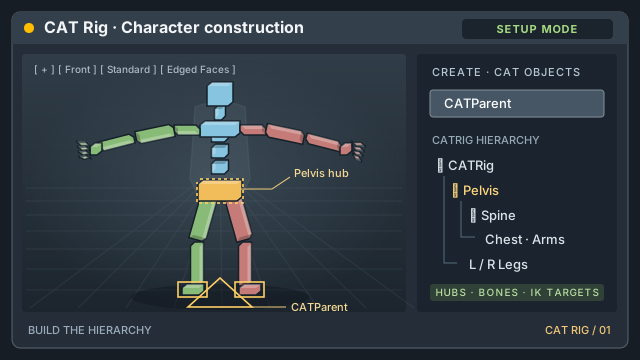
Build a CAT character from CATParent and hubs, place the bones, bind a character with Skin, paint and test vertex weights, and explore CAT's rig tools. Use your own model or a free CC0 example.

Skeleton · Skin · weights · CAT toolsOpen lab
3DS MAX / CAT RIG 02 AVAILABLE

CAT Animation Lab

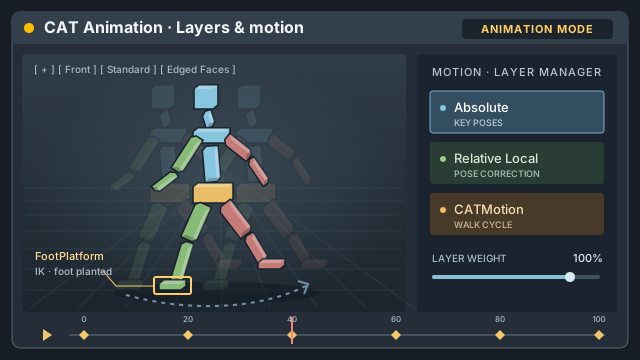
Animate the rig on an Absolute layer, key poses, keep a foot planted with the FootPlatform, add Relative Local corrections, and blend a CATMotion walk cycle.

Keyframes · IK · layers · walk cycleOpen lab

GENERATIVE IMAGE · 9 LABS

ComfyUI

Learn the interface and the shortcuts, what each node does, how LoRA and ControlNet change a generation, how to change only part of a picture, how to take it to 4K, how modern models like Flux work, how to steer a picture with other pictures, and how to make it move or turn it into a 3D model.

01 / COMFYUI AVAILABLE

ComfyUI Lab

Learn ComfyUI in a copy of its interface, with the real shortcuts: canvas, node search, Run and Queue, the seven nodes of text-to-image, seed, steps, CFG and samplers, image to image, what a LoRA is and what a ControlNet is, bypass, groups and workflows saved in the image. A simulator draws the pictures: no model or GPU needed.

Interface · KSampler · LoRA · ControlNet · shortcutsOpen lab
02 / COMFYUI AVAILABLE

Inpainting Lab

Change one part of a picture and keep the rest: paint and grow masks, compare the four inpainting routes (VAE Encode for Inpainting, Set Latent Noise Mask, InpaintModelConditioning, Differential Diffusion), finish without seams, inpaint small details with crop and stitch, outpaint beyond the frame and make clean plates.

Masks · inpainting models · outpainting · clean platesOpen lab
03 / COMFYUI AVAILABLE

Upscale & Detail Lab

Make big pictures that hold up at 100%: why models draw well only at their own size, resize vs upscale models, the hires fix and its denoise window, running out of memory, tiled upscaling without seams or ghosts, ControlNet Tile, face detailers and a full pipeline to 4K. Every result shows a zoom with the real pixels.

Upscale models · hires fix · tiles · detailers · 4KOpen lab
04 / COMFYUI AVAILABLE

Flux Lab

Work with a modern model: load Flux in three parts, make it fit in memory (fp8, GGUF), sample at CFG 1 with Flux Guidance, live without a negative prompt, choose dev or schnell, prompt with sentences and text in quotes, pick the right size, and use Flux Fill, Kontext editing and Flux LoRAs.

Models in parts · guidance · T5 · Fill · KontextOpen lab
05 / COMFYUI AVAILABLE

Control & Injection Lab

Steer with pictures, not only words: preprocessors and control maps, the right ControlNet for each map, stacking ControlNets, regional prompts with areas and masks, IPAdapter style, content and composition, FaceID identity and two faces with attention masks.

ControlNet · regions · IPAdapter · FaceIDOpen lab
06 / COMFYUI AVAILABLE

Sampling & Prompting Lab

Make better choices with the same graph: workflows with missing models, negative embeddings, samplers that converge and samplers that never settle, schedulers and enough steps, two samplers sharing the steps, prompts on a timetable, weights, dynamic prompts, long prompts, and how to explore and keep a seed.

Samplers · KSampler Advanced · prompts · seedsOpen lab
07 / COMFYUI AVAILABLE

LoRA Lab

Use LoRAs well and make your own: model and clip strength, trigger words and stacking, a dataset with variety, captions that say the right things, training with ComfyUI’s training nodes, underfitting and overfitting, learning rate and rank, and testing and picking the best file. With Pip, our own mascot.

Strength · datasets · captions · trainingOpen lab
08 / COMFYUI AVAILABLE

Video & 3D Lab

Make pictures move and give them a back: video latents with frames, fps and duration, prompts that describe motion and camera, image to video and first and last frame, video memory and length, the two experts of Wan 2.2, and from one picture to a 3D mesh with a clean input and the right resolution.

Wan · frames · image to video · meshOpen lab
09 / COMFYUI AVAILABLE

Workflow Lab

Everything around the nodes: open a workflow from someone else and install its missing custom nodes and models with the Manager, tidy links with reroutes, drive several widgets from one Int or String node, pack nodes into reusable subgraphs, and compare settings with XY grids.

Manager · reroutes · primitives · subgraphs · XYOpen lab
A SIMPLE LOOP
01 Open a lab
02 Change something
03 Observe the result